
What is an IP PBX and How Does It Work?
Learn what an IP PBX is, how it routes calls over the internet, key features, and whether a cloud or self-hosted business phone system fits your office.
Traditional landlines are becoming less common as businesses move their calls online. Old phone systems are costly to maintain, hard to scale, and lack the features modern businesses need.
An IP PBX is a business telephone system that routes voice calls over an internet data network instead of physical phone lines. It connects all internal office desk phones and manages inbound and outbound calls through digital gateways or online phone providers.
What is an IP PBX?
An IP PBX (Internet Protocol Private Branch Exchange) is a business phone system that handles company calls using computer networks instead of old copper-wired phones.
- Analog vs IP: Traditional systems need thick wall cabling and physical technicians for every change. An IP PBX runs on software through your standard office internet router, letting you add users in seconds.
- Free Internal Extensions: Team members can call each other for free by dialing short extension numbers from IP desk phones, computers, or mobile apps across any office branch.
- Central Call Routing: The system acts as a digital switchboard, routing external customer calls through automated menus and queues directly to available staff.
How Does an IP PBX Work?
An IP PBX works by transforming everyday speech into digital information that travels across standard network cables and Wi-Fi networks just like regular email or website traffic.
Converting Voice into Data Packets (VoIP and SIP)
When you speak into an IP phone, Voice over Internet Protocol (VoIP) converts your analog voice signals into digital binary code. This data gets sliced into small digital packets that travel across your local area network or the public internet.
Session Initiation Protocol (SIP) acts as the signaling language that sets up, manages, and ends the call. SIP tells the receiving device that a call is starting, keeps both endpoints synchronized during the conversation, and terminates the connection when someone hangs up.
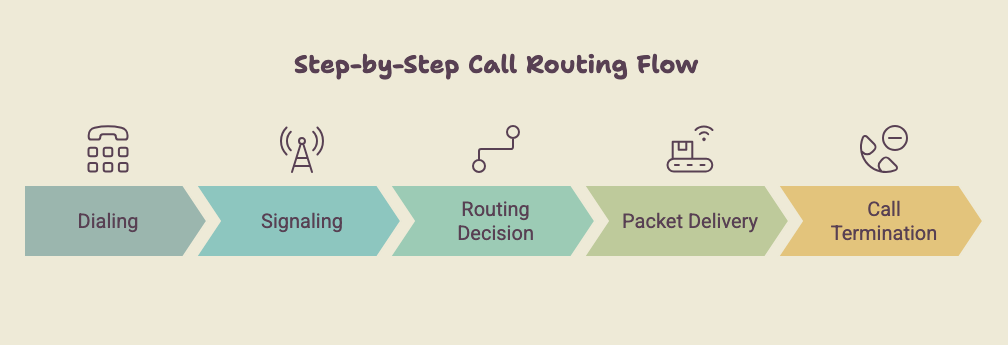
Step-by-Step Call Routing Flow
Every business call follows an automated sequence from the moment someone dials a number to the final hang-up.
- Dialing: A user dials a phone number or internal extension from a desk phone or computer app.
- Signaling: The IP phone contacts the IP PBX server over the local network using SIP to request the connection.
- Routing Decision: The IP PBX server checks its configured rules, such as office hours, extension mappings, automated IVR menus, or external trunk connections.
- Packet Delivery: Once the destination endpoint answers, voice packets stream directly between the two devices in real time.
- Call Termination: When either party disconnects, SIP sends a termination message to close the session and save the call recording.
Components Required
Setting up a complete IP PBX system requires three foundational building blocks to handle software control, outside connectivity, and user hardware.
- The main system that manages users, extensions, call groups, and call flows. It can run on a cloud server or office computer.
- Connect your phone system to external callers. SIP trunks use the internet, while GSM gateways use physical SIM cards.
- Devices your team uses for calls, including VoIP desk phones, laptops, and smartphones.
Key Features of a Modern IP PBX System
A modern business phone system replaces manual switchboards with built-in software tools that streamline how your company handles daily calls.
Multi-Level IVR and Automated Attendants
Welcome incoming callers with customized voice menus that guide them to the right department. Callers press a keypad digit to reach sales, support, or billing instantly, removing the need for a dedicated receptionist.
Ring Groups, Call Queues, and Call Forwarding
Route incoming traffic to entire teams simultaneously or in a set sequence. When your staff is busy, callers stay in a tidy queue with hold music, or the system forwards unanswered calls to personal mobile devices so no inquiry slips away.
Call Recording, Logs, and Voicemail-to-Email
Capture conversations for staff training and compliance while logging exact call durations and timestamps. When callers leave a message after business hours, the system automatically sends the audio recording directly to your email inbox.
Free Extension Calling Across Locations
A dedicatedIP PBX platformlinks all your offices, branches, and remote workers together under a single dial plan. Team members talk to each other without paying standard call charges simply by dialing internal extension numbers.
Cloud IP PBX vs Self-Hosted IP PBX
Cloud systems offer quick online deployment, but they lock you into recurring monthly user subscriptions while keeping voice recordings on third-party servers.
A self-hosted system runs on your own office computer, cutting monthly per-user fees and keeping all call data on your local drives.
| Feature | Cloud IP PBX | Self-Hosted IP PBX |
|---|---|---|
| Hosting | Remote vendor servers | Local office machine |
| Billing Model | Monthly per-seat fees | One-time software license |
| Data Privacy | Saved on public cloud | Kept on private drives |
| Hardware Control | Restricted by vendor | Works with any desk phone or SIM gateway |
Cloud setups suit teams prioritizing quick setup over recurring fees. For absolute data privacy, fixed costs, and zero per-seat licenses, a self-hosted IP PBX is the smarter long-term choice.
Key Benefits of Moving to an IP PBX
Upgrading to an IP PBX gives your office lower bills, simpler team management, and complete data ownership.
- Lower Monthly Costs: Save on phone bills by using cost-effective SIP trunks or local SIM gateways, while eliminating expensive recurring per-user seat fees.
- Instant Scalability: Add new extensions or staff members in seconds using a web dashboard without laying new physical cables across the office.
- Total Call Privacy: Keep all customer voice recordings and call logs on your own private storage instead of exposing sensitive data to public cloud platforms.
Which IP PBX Setup Fits Your Business?
Cloud IP PBX works well for remote teams comfortable paying monthly fees to avoid managing hardware. If you operate an on-site office, want to eliminate recurring per-seat fees, and need total privacy for customer call recordings, a self-hosted IP PBX provides the best value.
A self-hosted system gives your company modern call routing, lower bills, and complete ownership of your phone data without user limits.
To see how an on-premises system runs within your own network environment,request a live Wivox demoand test the interface firsthand.
EPABX vs IP PBX: What Indian Offices Should Buy i…