
What is SIP Trunking? A Plain-English Guide
Learn what SIP trunking is in simple words. Understand how virtual phone lines replace copper wiring, cut office phone bills, and connect to your IP PBX.
Business phone systems once depended on physical copper wires. These systems were expensive to install, hard to upgrade, and easy to damage.
SIP trunking replaces copper phone lines with an internet connection. It connects your office phone system to external networks using your existing broadband.
This makes it easier to add phone lines, reduce call costs, and connect remote workers without installing new cables.
Let’s clear the fundamentals first.
Understanding SIP Trunking in Simple Terms
SIP stands for Session Initiation Protocol, the digital standard that sets up and ends internet phone calls. It gives businesses a reliable way to make external voice calls without buying dedicated telephone hardware.
- A SIP trunk connects your office phone system to the phone network through the internet.
- Your voice is converted into digital data and sent over the internet.
- It connects your PBX to phone carriers without the need for physical phone lines.
How SIP Trunking Operates Step by Step
Placing a business call over a virtual trunk takes only a split second from start to finish.
The entire process works behind the scenes so your employees never notice a difference from a normal phone call.
- Dialing from an Extension: An employee dials an outside number using an office desk IP phone, a laptop softphone app, or a mobile device connected to the office network.
- Converting Voice into Data: The office IP PBX receives the audio signal, converts the spoken voice into small digital data packets, and attaches the destination number using standard SIP rules.
- Traveling Across Broadband: These voice packets leave your office network and travel securely across your standard business internet connection to your telecom SIP provider.
- Handoff to Outside Networks: The SIP provider receives the digital stream, translates it for public telecom systems, and delivers the call directly to the target mobile phone or landline anywhere in the world.
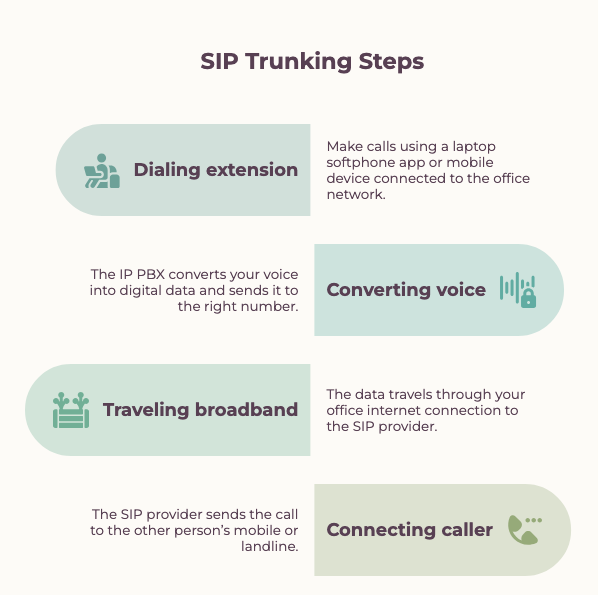
This seamless data handoff happens continuously in both directions, giving callers instant connections and clear audio without any physical telephone company lines inside your premises.
The Difference Between SIP, VoIP, and Traditional PRI Lines
Many business owners hear these telecom terms used interchangeably, but each refers to a distinct part of your phone infrastructure.
VoIP Technology vs SIP Connections
| Feature | VoIP (Voice over Internet Protocol) | SIP Trunking (Session Initiation Protocol) |
|---|---|---|
| Role | Core technology/data | Transport/bridge |
| Function | Converts voice signals into digital data packets | Connects an internal phone system to public telephone networks |
| Analogy | The cargo (voice data) | The virtual pipe or bridge carrying the cargo |
| Scope | Manages transmission over IP networks | Extends calls outside the private office network |
Rigid PRI Cables vs Flexible Virtual Channels
A legacy Primary Rate Interface, or PRI line, uses physical copper wires bundled into fixed groups of 30 channels. If your business needs 32 lines, you must purchase two entire 30-channel bundles and pay for 28 unused lines every month. SIP channels are software-controlled connections that scale line by line, so you only pay for the exact number of active calls your office handles.
Setup Speed and Hardware Demands
Traditional PRI systems require physical line drops from the telecom provider, dedicated wall frames, and expensive interface cards installed inside your PBX chassis. Modern SIP setups run entirely over your existing office internet connection with zero extra cards or cable pulls. Adopting modernIP PBX featureslets your team manage call routing, configure trunk gateways, and assign extensions directly through a simple web dashboard.
Benefits of Moving to Virtual Phone Lines
Switching to virtual connections gives modern offices immediate cost savings and everyday flexibility. Replacing aging copper telephone wires with software-managed digital channels allows growing teams to communicate without hardware bottlenecks or expensive carrier contracts.
- Pay only for active simultaneous calls instead of paying monthly rentals for idle copper lines.
- Add or remove calling channels in minutes through a web dashboard without scheduling technician visits.
- Automatically divert incoming calls to backup links or employee mobile numbers if office internet drops.
Requirements to Set Up a SIP Trunk
Transitioning your workplace to virtual calling requires only three core components in your office network.
Stable Business Broadband
Voice data demands a reliable, low-latency internet connection. Each active phone call typically requires around 85 to 100 kilobits per second of dedicated upload and download bandwidth to maintain clear audio quality.
A Modern IP PBX
An on-premises IP PBX or software switch acts as the central brain of your office telephone system. It handles your internal extensions, routes incoming inquiries, records customer conversations, and connects your local devices to the virtual trunk.
A Certified Telecom Provider
An authorized telecom carrier supplies your official business phone numbers and provisions your calling channels. They serve as the outside bridge that carries your internet voice traffic directly into public landline and mobile networks.
Upgrading Your Office Phone System
Old copper telephone cables are quickly disappearing. Modern businesses now use digital lines to cut monthly calling bills, add new lines in seconds, and get clear audio over normal office internet.
Switching does not require endless monthly software fees. Pairing affordable digital lines with your own office server keeps you in full control of your call records and voice data.
Upgrade your office phones today. See howWivoxlets you run a complete business phone setup on your local network with easy call routing, built-in recording, and unlimited extensions without extra per-user charges.